Filter text with $regex
Choose Load sample data, open acme.orders, and select Documents. This filter matches names that start with “Jonas”. The i option ignores case, and the dotted field name reaches into the nested customer document.
{ "customer.name": { "$regex": "^jonas", "$options": "i" } }In the built-in sample, expect three orders for Jonas Weber. Try { "status": "paid" } for an exact match or {} to clear the filter.
Find one document by ObjectId
On a MongoDB connection, paste the full 24-character hexadecimal value inside $oid. This example finds ORD-2001 in the practice collection below.
{ "_id": { "$oid": "675000000000000000000001" } }When your collection stores IDs as strings, use a plain string as the value. MongoDB treats a string and an ObjectId as different types even when the characters match.
Find documents in a UTC date range
The filter below selects timestamps on November 1, 2026 UTC. $gte includes midnight at the start of November 1. $lt excludes midnight at the start of November 2. To filter by a local calendar date, convert both local midnights to UTC first.
{
  "created_at": {
    "$gte": { "$date": "2026-11-01T00:00:00.000Z" },
    "$lt": { "$date": "2026-11-02T00:00:00.000Z" }
  }
}
On the practice collection, expect ORD-2001 and ORD-2002. The document at the upper boundary, ORD-2003, is outside the range.
Try the ObjectId and date filters with three practice orders
Save these three lines as filter-orders.jsonl. On a development MongoDB connection, create an empty collection called filter_orders and import the JSON Lines file. Open that collection in Documents before running the ObjectId and date filters.
{"_id":{"$oid":"675000000000000000000001"},"reference":"ORD-2001","created_at":{"$date":"2026-11-01T00:00:00.000Z"}}
{"_id":{"$oid":"675000000000000000000002"},"reference":"ORD-2002","created_at":{"$date":"2026-11-01T23:59:59.999Z"}}
{"_id":{"$oid":"675000000000000000000003"},"reference":"ORD-2003","created_at":{"$date":"2026-11-02T00:00:00.000Z"}}
Sort matching documents newest first
Keep the date filter in Filter. Open Sort & projection, enter the object below in Sort, and click Run. The two practice results should start with ORD-2002.
{ "created_at": -1, "_id": -1 }The second field breaks ties when two documents have the same date.
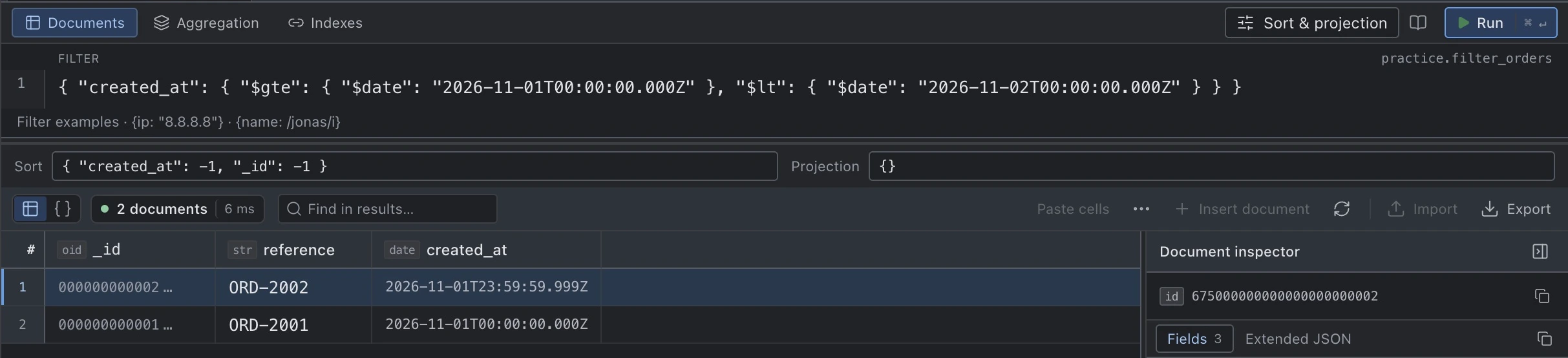
ORD-2002 above ORD-2001.Check why a filter returns no documents
- Run
{}to confirm you selected the intended database and collection. - Check the exact field name and path, including upper and lower case. An order with a nested
customerobject needs a path such ascustomer.name. - Check the stored BSON type. A date stored as text needs a different query from a BSON Date. Confirm your dates and time zone before narrowing the range.
To group or summarize the matches, start with a $match stage in an aggregation pipeline.
Build a MongoDB compound index for a filter and sort
Download KeplerGrid to try the built-in sample, or browse the KeplerGrid guides.
Continue with matching array elements, checking null and missing fields, projecting fields, or editing a nested field.
Match any or all tags, count all documents matching a filter, or page results in a stable order.
When several filters belong together, group them with $and and $or.
Next, Query a MongoDB date range with $gte and $lt.
Next, Find MongoDB points inside a GeoJSON polygon with $geoWithin.