Find repeated values with $group
Open a collection on a MongoDB connection, select Aggregation → JSON, paste this pipeline, and click Run pipeline. The example checks one scalar field, external_id, before creating a regular single-field unique index.
[
  { "$group": {
    "_id": { "$ifNull": ["$external_id", null] },
    "count": { "$sum": 1 }
  } },
  { "$match": { "count": { "$gt": 1 } } },
  { "$sort": { "count": -1, "_id": 1 } }
]
Each result has the repeated field value in _id and the number of matching documents in count. The pipeline groups explicit null and missing values together because they share a null key in a regular single-field unique index. A result with _id: null flags that conflict.
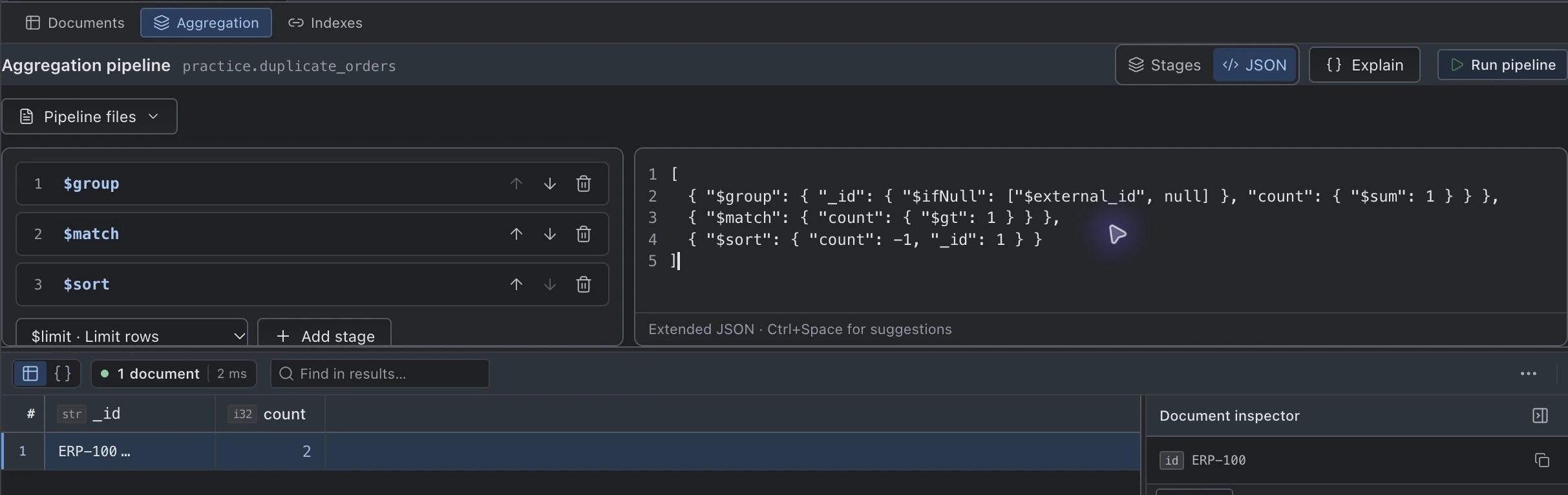
ERP-100. The pipeline reports that value once with a count of two.Try it with three practice orders
Save these lines as duplicate-orders.jsonl. Create an empty collection called duplicate_orders on a development MongoDB server, then import the file. Run the pipeline against that collection. Expect one result for ERP-100 with a count of 2.
{"_id":"a","external_id":"ERP-100","status":"open"}
{"_id":"b","external_id":"ERP-100","status":"held"}
{"_id":"c","external_id":"ERP-200","status":"open"}
Inspect both documents before changing either
Switch to Documents, paste the filter below into Filter, and click Run. In the practice collection it returns documents a and b.
{ "external_id": "ERP-100" }Check the source system before deciding whether to correct a key or consolidate records. Two documents can share a key while holding different information. In the practice collection only, change document b to ERP-101, review and commit the edit, then rerun the pipeline. It should return zero groups.
Create and verify the unique index
- Use a Read & write connection and a MongoDB account with permission to create indexes. Open Indexes for the intended collection.
- Under Create an index, enter the key below and select Unique values.
- Click Create index and confirm the database and collection in the prompt. Verify the new key appears in the indexes list with the UNIQUE label.
{ "external_id": 1 }MongoDB can reject the build if a conflicting value exists when it checks the collection, including one inserted after your scan. If that happens, rerun the check with current data. For array fields, compound keys, or partial indexes, check the actual index keys and which documents participate before adapting this example.
Use the MongoDB query filters guide to inspect matching documents or the aggregation guide to check the output of each stage.
Next, Enforce per-tenant uniqueness with a MongoDB compound index.