Load the practice collection
Run once in mongosh against a development instance with an empty meterReadings practice collection.
const lab = db.getSiblingDB("keplergrid_practice")
lab.meterReadings.insertMany([
  { _id: "a-1", device: "A", minute: 1, reading: 10 },
  { _id: "a-2", device: "A", minute: 2, reading: null },
  { _id: "a-3", device: "A", minute: 3 },
  { _id: "b-1", device: "B", minute: 1, reading: null },
  { _id: "b-2", device: "B", minute: 2, reading: 25 }
])
In KeplerGrid, open keplergrid_practice.meterReadings with a Read only connection.
Keep the observed flag and fill within each device
Use MongoDB 5.3 or later. Paste this into Aggregation → JSON and run it. The first stage records whether the input contained a numeric reading.
[
  { "$set": { "observed": { "$isNumber": "$reading" } } },
  { "$fill": {
    "partitionBy": "$device", "sortBy": { "minute": 1 },
    "output": { "reading": { "method": "locf" } }
  } },
  { "$sort": { "device": 1, "minute": 1 } }
]
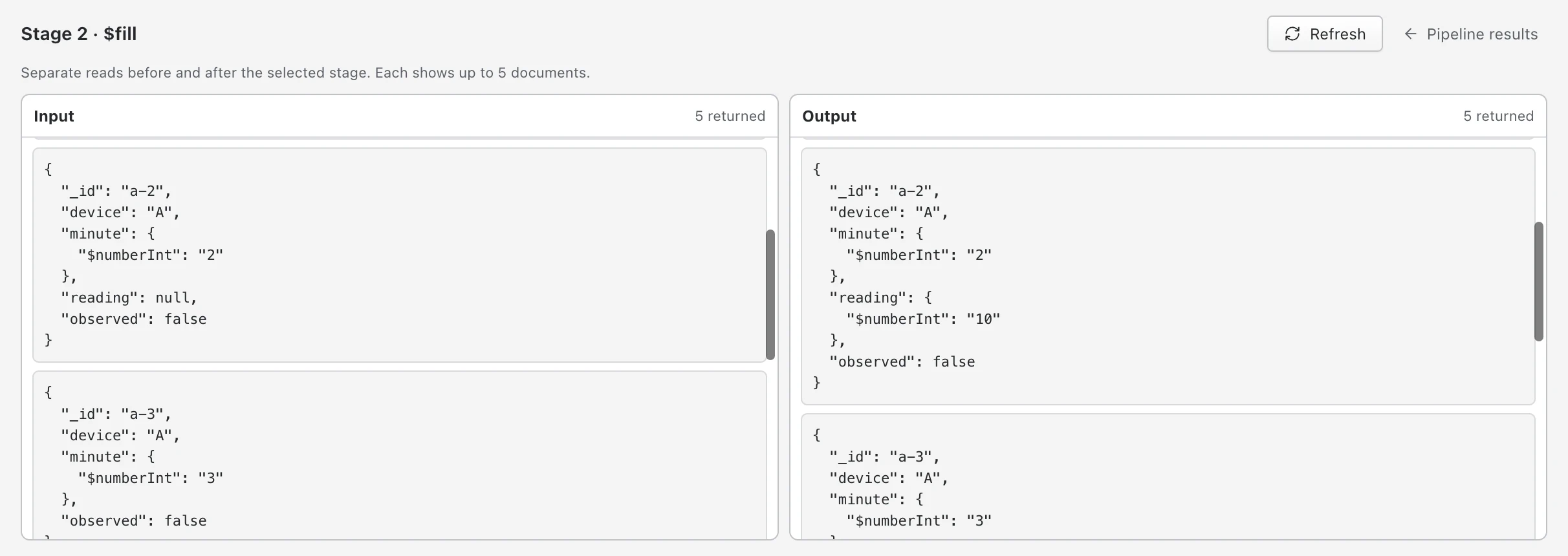
Device A has readings 10, 10, and 10, with only the first marked observed. Device B starts at null because it has no earlier reading, then reports 25. The row count does not change.
Compare measured and carried-forward values
Select $fill in Stages to compare the inputs with their filled outputs. Use a stable time order within each device and keep the observed flag when exporting or reporting estimates. The pipeline fills values on existing rows. Use $densify when the missing times have no row at all.
See how to look up the preceding row in a window or revisit the related KeplerGrid walkthrough.