Load the practice collection
Run once in mongosh against a development instance with an empty dailyCounts practice collection.
const lab = db.getSiblingDB("keplergrid_practice")
lab.dailyCounts.insertMany([
  { day: ISODate("2026-04-01T00:00:00.000Z"), orders: 4 },
  { day: ISODate("2026-04-04T00:00:00.000Z"), orders: 0 },
  { day: ISODate("2026-04-05T00:00:00.000Z"), orders: 2 }
])
In KeplerGrid, open keplergrid_practice.dailyCounts with a Read only connection.
Generate rows between the first and last days
Use MongoDB 5.1 or later. The fixture starts with one row per observed UTC day. Paste this pipeline into Aggregation → JSON and run it.
[
  { "$set": { "observed": true } },
  { "$densify": {
    "field": "day",
    "range": { "step": 1, "unit": "day", "bounds": "full" }
  } },
  { "$set": {
    "orders": { "$ifNull": ["$orders", 0] },
    "observed": { "$ifNull": ["$observed", false] }
  } },
  { "$project": { "_id": 0, "day": 1, "orders": 1, "observed": 1 } },
  { "$sort": { "day": 1 } }
]
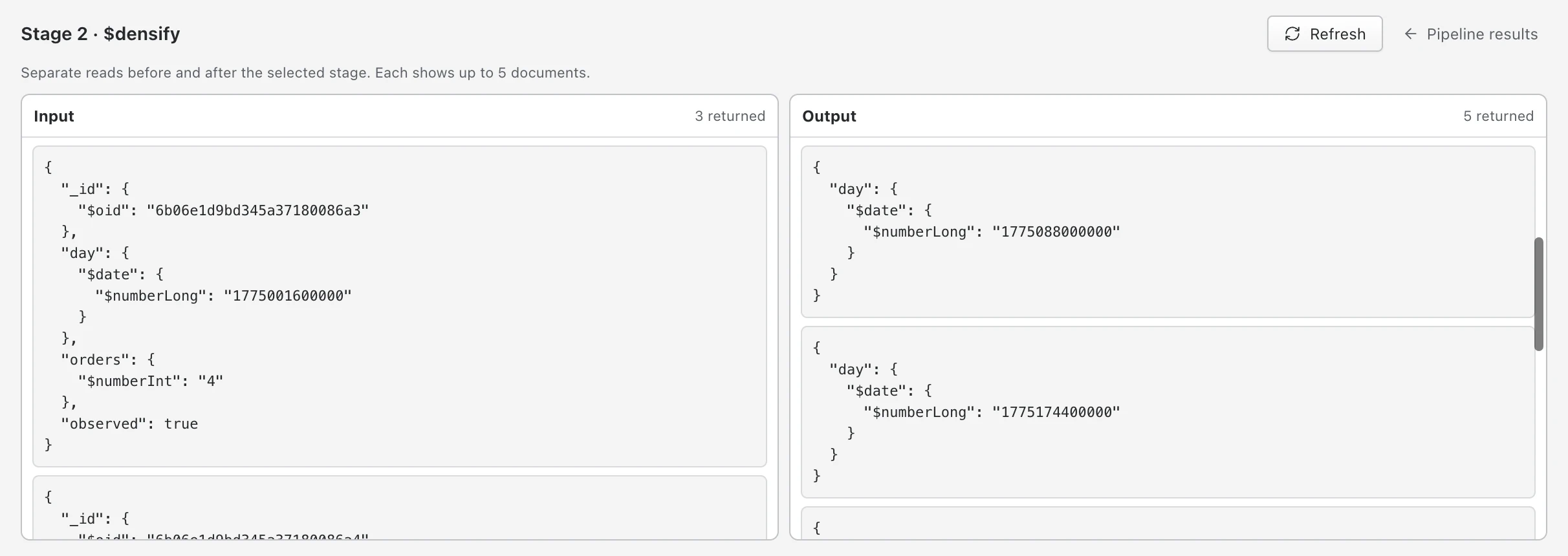
April 2 and 3 are generated with an order count of zero and observed: false. April 4 has a recorded count of zero and keeps observed: true. In Stages, inspect $densify to see three inputs and five outputs.
Choose what a gap means before filling it
Zero fits an order count when absent days mean there were no orders. Missing sensor data may need to stay unknown. The "full" bounds cover the observed input span. Use an explicit range when the report must include days beyond the first and last observations.
See how to set explicit UTC date boundaries or revisit the related KeplerGrid walkthrough.
Next, Fill MongoDB readings with $fill and carry the last value forward.