Load the practice orders and customer
Use MongoDB 5.0 or later for $setWindowFields. Run this setup once in mongosh against a development instance with empty practice collections. The fixture also supports the linked array, conversion, and joined-document exercises.
const lab = db.getSiblingDB("keplergrid_transform_lab")
lab.orders.insertMany([
  {
    _id: "ORD-101", customerId: "C-100",
    placedAt: ISODate("2026-03-01T09:00:00Z"),
    amount: Decimal128("12.50"), amountRaw: "12.50",
    lines: [
      { sku: "NT-01", quantity: 2, unitPrice: Decimal128("4.00"), status: "paid" },
      { sku: "PE-99", quantity: 1, unitPrice: Decimal128("3.00"), status: "cancelled" }
    ]
  },
  {
    _id: "ORD-102", customerId: "C-100",
    placedAt: ISODate("2026-03-01T09:00:00Z"),
    amount: Decimal128("7.50"), amountRaw: "pending",
    lines: [
      { sku: "AP-02", quantity: 1, unitPrice: Decimal128("3.25"), status: "paid" },
      { sku: "NB-05", quantity: 2, unitPrice: Decimal128("1.00"), status: "paid" }
    ]
  },
  {
    _id: "ORD-103", customerId: "C-100",
    placedAt: ISODate("2026-03-02T09:00:00Z"),
    amount: Decimal128("5.00"), amountRaw: null
  },
  {
    _id: "ORD-201", customerId: "C-200",
    placedAt: ISODate("2026-03-01T10:00:00Z"),
    amount: Decimal128("10.00"), amountRaw: Decimal128("10.00"),
    lines: "legacy"
  },
  {
    _id: "ORD-202", customerId: "C-200",
    placedAt: ISODate("2026-03-02T10:00:00Z"),
    amount: Decimal128("3.25"), lines: null
  }
])
lab.customers.insertOne({ _id: "C-100", name: "Cedar Studio", tier: "standard" })
Sum from the first order through each current order
In KeplerGrid, open keplergrid_transform_lab.orders on a Read only connection. Select Aggregation → JSON, paste the pipeline, and select Run pipeline.
[
  { "$setWindowFields": {
    "partitionBy": "$customerId",
    "sortBy": { "placedAt": 1, "_id": 1 },
    "output": {
      "runningAmount": {
        "$sum": "$amount",
        "window": { "documents": ["unbounded", "current"] }
      }
    }
  } },
  { "$sort": { "customerId": 1, "placedAt": 1, "_id": 1 } }
]
partitionBy puts each customer’s orders in a separate window. The window includes every order from the start of that partition through the current row. The _id tie-breaker puts ORD-101 before ORD-102 even though their timestamps are equal.
Use the final $sort to guarantee the display order. The window’s sortBy determines which values are included at each step.
Check the totals in KeplerGrid
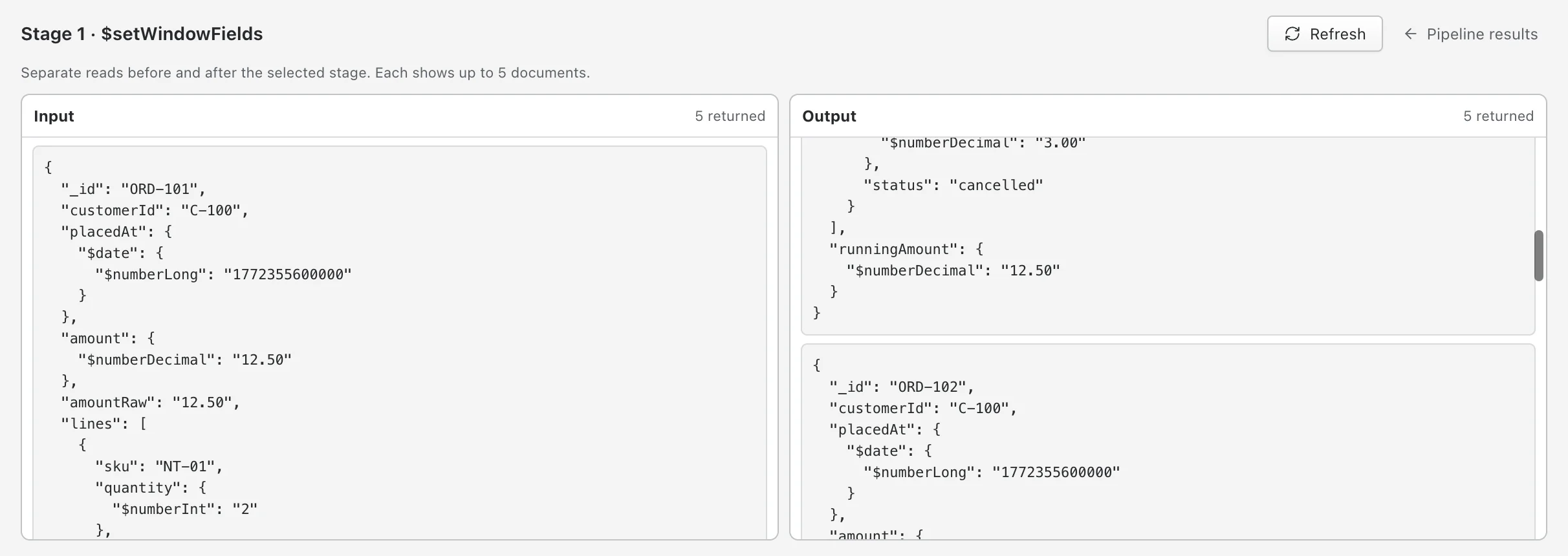
In Stages, select $setWindowFields to compare the original rows with their new runningAmount field. Select Pipeline results for the sorted rows.
| Customer | Order | Running amount |
|---|---|---|
| C-100 | ORD-101 | 12.50 |
| C-100 | ORD-102 | 20.00 |
| C-100 | ORD-103 | 25.00 |
| C-200 | ORD-201 | 10.00 |
| C-200 | ORD-202 | 13.25 |
If you add a $match before the window, earlier orders excluded by the match disappear from the running totals. To display only recent rows while retaining earlier amounts in the totals, calculate the window first and filter afterward.
See how to collapse orders into daily groups or how to sort with a tie-breaker.
Next, Compare MongoDB rows with the previous value using $shift.