Load the practice collection
Run once in mongosh against a development instance with an empty shipments practice collection.
const lab = db.getSiblingDB("keplergrid_practice")
lab.shipments.insertMany(Array.from({ length: 240 }, (_, i) => ({
  _id: i, code: i < 4 ? "ready" : "waiting", units: i + 1
})))
lab.shipments.createIndex({ code: 1 }, { name: "shipment_code" })
In KeplerGrid, open keplergrid_practice.shipments with a Read only connection.
Record the baseline plan
In Aggregation → JSON, paste this pipeline and choose Explain. On the fixture, shipment_code helps MongoDB return four shipments.
[
  { "$match": { "code": "ready" } },
  { "$project": { "_id": 0, "units": 1 } }
]
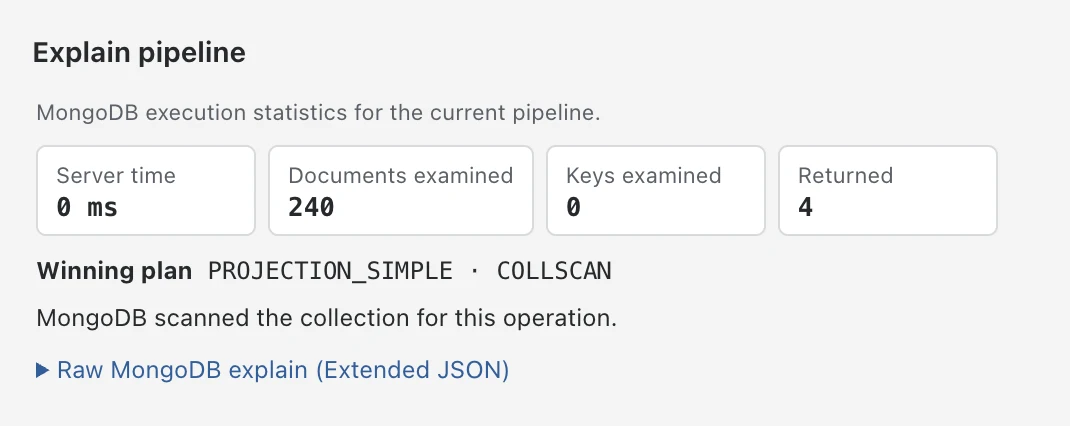
Record the winning plan, documents examined, and returned count. There is no hint in this pipeline, so you can see the plan MongoDB actually chooses.
Hide the index and rerun Explain
Use the same mongosh session to hide the index on this disposable collection. A hidden index is still maintained, but the planner cannot use it.
lab.shipments.hideIndex("shipment_code")Run Explain again in KeplerGrid. The fixture still returns four results. With no eligible index for code, MongoDB uses a collection scan and examines 240 documents. A real workload might select another index instead.
Restore the index when the comparison is done
Unhide the index in the same shell and run Explain again to check that it is eligible for the planner.
lab.shipments.unhideIndex("shipment_code")Hiding an index can change query performance immediately. Unique and TTL behavior still applies while those indexes are hidden. Test with a representative workload and a rollback plan before changing an index used by an application.
See how to check observed index use before a change or revisit the related KeplerGrid walkthrough.