Load the practice collection
Run once in mongosh against a development instance with an empty coveredOrders practice collection.
const lab = db.getSiblingDB("keplergrid_practice")
lab.coveredOrders.insertMany(Array.from({ length: 124 }, (_, i) => ({
  _id: i,
  status: i < 4 ? "paid" : "pending",
  sku: "SKU-" + String(i).padStart(3, "0"),
  note: "Practice order " + i
})))
lab.coveredOrders.createIndex({ status: 1, sku: 1 }, { name: "status_sku" })
In KeplerGrid, open keplergrid_practice.coveredOrders with a Read only connection.
Project only fields the index contains
Open Aggregation → JSON, paste the pipeline, and choose Explain. Excluding _id keeps the projection inside the compound index.
[
  { "$match": { "status": "paid" } },
  { "$project": { "_id": 0, "sku": 1 } }
]
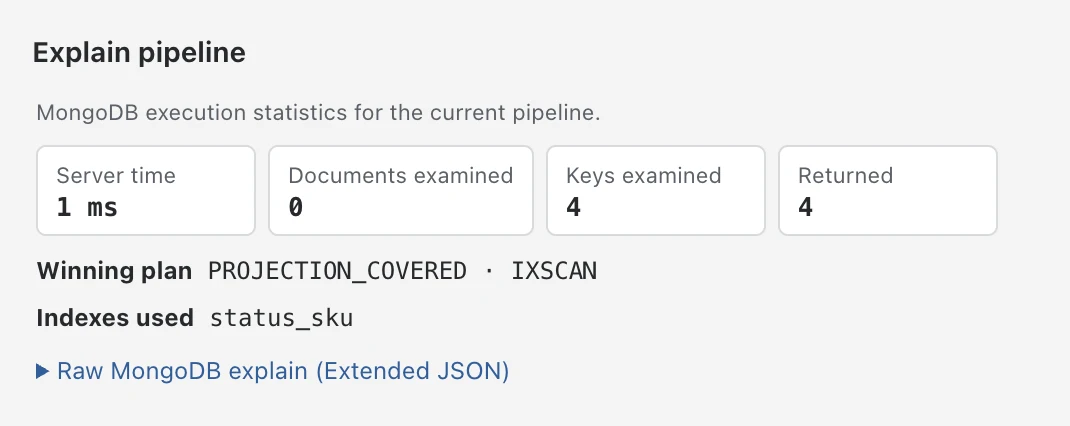
In this fixture the status_sku index supplies four results and MongoDB examines zero documents. Confirm that the query returns results before using zero documents examined as evidence of coverage.
Add a field that requires a document fetch
Add the unindexed note to the projection and run Explain again.
[
  { "$match": { "status": "paid" } },
  { "$project": { "_id": 0, "sku": 1, "note": 1 } }
]
The same four orders match. MongoDB reads their documents for the notes. On a real collection, verify the winning plan and the number of documents examined. Merely seeing an index in the plan does not establish coverage.
See how to read aggregation execution statistics or revisit the related KeplerGrid walkthrough.