Prepare a CSV with a header row
Save this text as typed-orders.csv. Use a fresh collection such as keplergrid_import.typed_orders on a disposable MongoDB server. Connect in Read & write mode with an account allowed to insert into that collection.
_id,quantity,unitPrice,placedAt
0007,2,12.50,2026-11-23T08:30:00Z
0012,5,4.25,2026-11-23T15:45:00Z
If you open the CSV in a spreadsheet before importing, check that it preserves the leading zeros in _id. KeplerGrid can preserve the text present in the file.
Choose each BSON type before review
- Right-click the practice collection in the database browser and select Import documents…. Browse for the CSV file or drop it into the dialog.
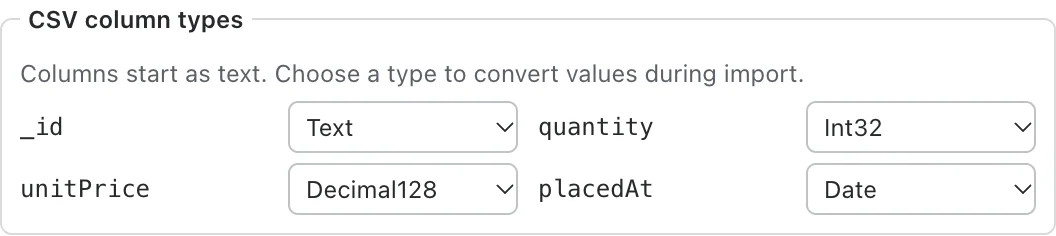
- Under CSV column types, leave
_idas Text. Setquantityto Int32,unitPriceto Decimal128, andplacedAtto Date. - Click Review import and check the destination and the two-document count. Click Import 2 documents after verifying both. Confirm the result shows two inserted documents.
Columns start as text. A date column needs timestamps with an explicit time zone. An invalid typed cell can stop review with its source row and column. Fix the source file or its type mapping, then review it again.
Read back a document and check the types
Open Documents, run this filter, and choose Extended JSON in the inspector for the result.
{ "_id": "0007" }The ID stays "0007". The other fields should show $numberInt for quantity, $numberDecimal for the price, and $date for the timestamp. Reimporting these IDs into the same collection conflicts with the existing IDs.
Use Extended JSON Lines import when the source already contains BSON types, or see how to edit a Decimal128 value.