Load the practice collection
Run once in mongosh against a development instance with an empty rankedOrders practice collection.
const lab = db.getSiblingDB("keplergrid_practice")
lab.rankedOrders.insertMany([
  { _id: "A-01", customer: "A", total: 120 },
  { _id: "A-02", customer: "A", total: 120 },
  { _id: "A-03", customer: "A", total: 110 },
  { _id: "B-01", customer: "B", total: 55 }
])
In KeplerGrid, open keplergrid_practice.rankedOrders with a Read only connection.
Keep two orders in each customer group
Use MongoDB 5.2 or later. In Aggregation → JSON, paste this pipeline and choose Run pipeline.
[
  { "$group": {
    "_id": "$customer",
    "topOrders": { "$topN": {
      "n": 2,
      "sortBy": { "total": -1, "_id": 1 },
      "output": { "orderId": "$_id", "total": "$total" }
    } }
  } },
  { "$sort": { "_id": 1 } }
]
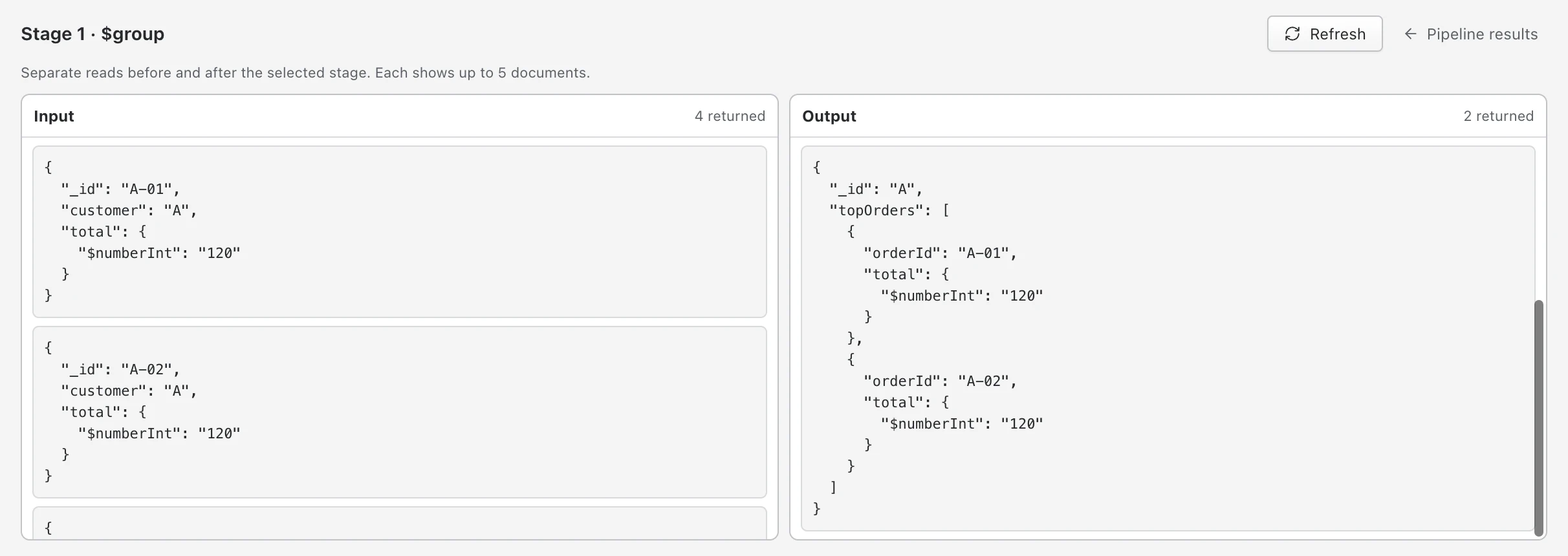
Customer A returns A-01 then A-02. Their totals tie, so the unique order ID gives a repeatable order. Customer B gets a one-element array. The final $sort orders the customer rows.
Compare the input orders with the grouped output
In Stages, inspect $group. Four input orders become two customer documents. In the JSON result, check which order fields the output expression retained.
See how to turn the returned order arrays into rows or revisit the related KeplerGrid walkthrough.