Index open orders on a practice server
Run this once in mongosh on a disposable MongoDB server. Use a fresh scratch database and an account that can insert documents and create indexes there.
const lab = db.getSiblingDB("keplergrid_partial_lab")
lab.orders.insertMany(Array.from({ length: 1200 }, (_, i) => ({
  _id: i + 1,
  tenantId: "store-" + String(i % 20).padStart(3, "0"),
  status: i < 120 ? "open" : "closed"
})))
lab.orders.createIndex(
  { tenantId: 1, _id: -1 },
  {
    name: "open_orders_by_tenant",
    partialFilterExpression: { status: "open" }
  }
)
Connect KeplerGrid in Read only mode and open keplergrid_partial_lab.orders. In Indexes, check for open_orders_by_tenant and its key order. The index list shows the name and keys. To confirm the partial filter itself, inspect lab.orders.getIndexes() in mongosh.
Explain a query that asks for open orders
Open Aggregation → JSON, paste this pipeline, and select Explain. Its $match guarantees that every match meets the partial filter.
[
  { "$match": { "tenantId": "store-007", "status": "open" } },
  { "$sort": { "_id": -1 } },
  { "$limit": 3 }
]
On the practice data, the winning plan lists open_orders_by_tenant and IXSCAN. Select Run pipeline and check that it returns IDs 108, 88, and 68.
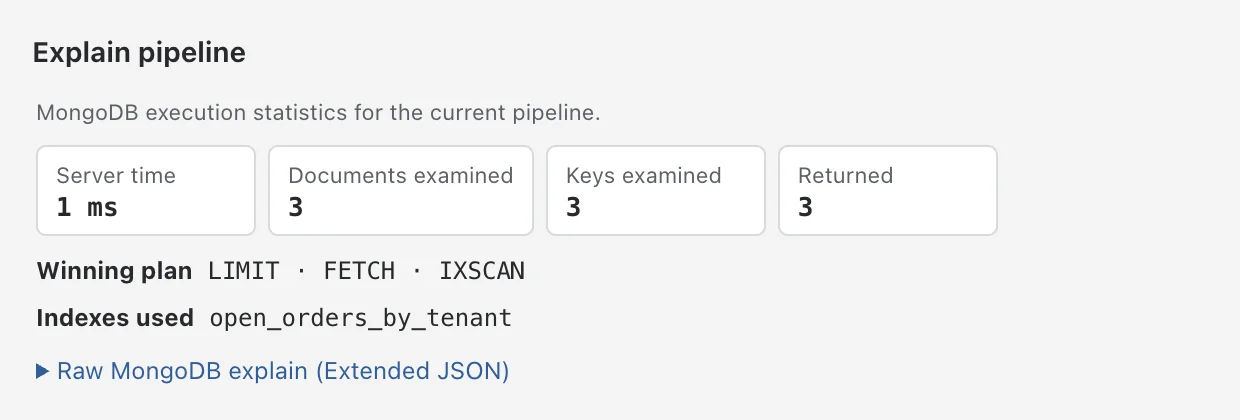
open_orders_by_tenant and returned three documents.Explain the same query without the status condition
Change only the first stage, then open Explain again.
{ "$match": { "tenantId": "store-007" } }This time the requested results include closed orders. An index containing only open orders cannot supply all matches, so the winning plan uses another access path. Run the pipeline and compare IDs 1188, 1168, and 1148 with your first result.
The planner can choose a partial index when the query logically implies the index filter. Eligibility and selection are separate. Verify the winning index in Explain on your actual data distribution and with any competing indexes present.
See how to order a compound index for filtering and sorting or read a MongoDB Explain plan.
To compare the work done by text filters, test MongoDB regex patterns with Explain.