Publish a loopback port
In a new practice directory with current Docker and Compose available, save this as compose.yaml. The container listens on 27017. The desktop client connects to port 27018 on your machine.
This example uses a disposable, unauthenticated MongoDB. Keep the loopback binding and use synthetic data.
services:
  mongo:
    image: mongo:8.0.20
    ports:
      - "127.0.0.1:27018:27017"
Start MongoDB and add one order
Run these commands from the directory containing the file. If the shell reports that MongoDB is starting, wait until the container is ready before running the insert.
docker compose -p keplergrid-practice up -d
docker compose -p keplergrid-practice exec mongo mongosh --quiet   --eval 'db.getSiblingDB("keplergrid_docker").orders.insertOne({_id:"ORD-101",status:"paid"})'
The insert prints insertedId: "ORD-101".
Open the same collection in both clients
In KeplerGrid, choose File → New Connection… → Connection string. In Compass, open Add New Connection. Use this URI in either client.
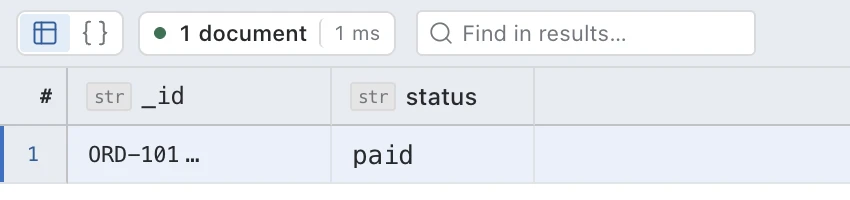
mongodb://127.0.0.1:27018/keplergrid_dockerOpen keplergrid_docker.orders and filter by { _id: "ORD-101" } to see one paid order. A client running in the same Compose network would instead use mongo:27017.
Check the published port
Run docker compose -p keplergrid-practice port mongo 27017. This file should report 127.0.0.1:27018. If you used the container’s port in the desktop URI, correct it and test again. Another service might already be listening on 27017, so compare the database name and fixture after connecting.
Stop the practice project when finished. The container image may still be cached locally.
docker compose -p keplergrid-practice downTroubleshoot connection refused · Connect to a Docker replica set