Load the practice collection
Run once in mongosh against a development instance with an empty categories practice collection.
const lab = db.getSiblingDB("keplergrid_practice")
lab.categories.insertMany([
  { _id: "store", name: "Store" },
  { _id: "office", name: "Office", parentId: "store" },
  { _id: "paper", name: "Paper", parentId: "office" },
  { _id: "notebooks", name: "Notebooks", parentId: "paper" }
])
In KeplerGrid, open keplergrid_practice.categories with a Read only connection.
Follow each category’s parent reference
Open Aggregation → JSON and run this pipeline. Start at the selected category’s parent ID and continue following each matching category’s parentId.
[
  { "$match": { "_id": "notebooks" } },
  { "$graphLookup": {
    "from": "categories",
    "startWith": "$parentId",
    "connectFromField": "parentId",
    "connectToField": "_id",
    "as": "ancestors",
    "maxDepth": 1,
    "depthField": "depth"
  } }
]
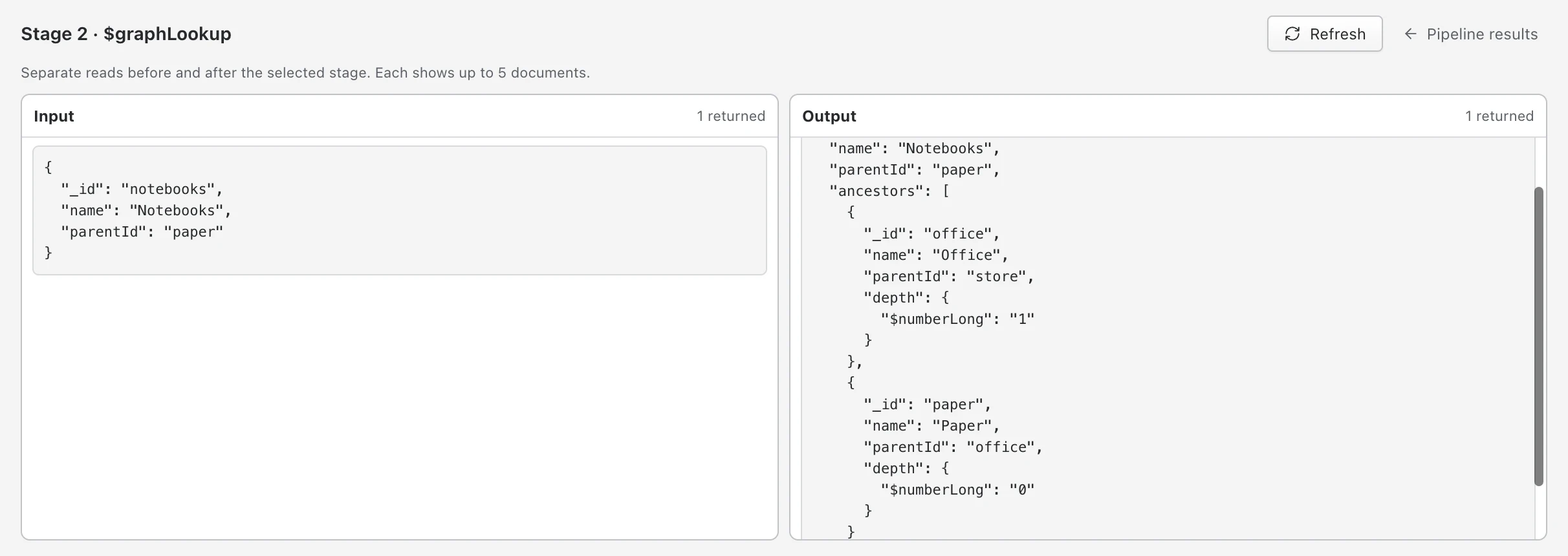
The result contains Paper at depth 0 and Office at depth 1. Store is beyond the limit. The returned array has no guaranteed order, so inspect the depth field to identify the nearest parent.
Check the path and choose a depth limit
In Stages, compare the category under Input with the new ancestors array under Output. Increase maxDepth to 2 to reach Store in this fixture. Each depth can branch to multiple matches in other schemas. Filter starting documents and set a sensible depth before running a recursive lookup on a large collection.
See how to sort an embedded array in the result or revisit the related KeplerGrid walkthrough.