Create five orders and three customers
Use an empty database named keplergrid_reports on a disposable development server. Run this setup in mongosh. The quantities are integers and unit prices are BSON Decimal128 values. The customers are used in the linked $lookup exercise.
const practice = db.getSiblingDB("keplergrid_reports");
practice.orders.insertMany([
  { _id: "O-101", customerId: "C-100", status: "paid",
    quantity: 2, unitPrice: Decimal128("12.50") },
  { _id: "O-102", customerId: "C-100", status: "pending",
    quantity: 1, unitPrice: Decimal128("4.25") },
  { _id: "O-103", customerId: "C-100", status: "paid",
    quantity: 3, unitPrice: Decimal128("1.10") },
  { _id: "O-201", customerId: "C-200", status: "pending",
    quantity: 3, unitPrice: Decimal128("2.75") },
  { _id: "O-202", customerId: "C-200", status: "cancelled",
    quantity: 1, unitPrice: Decimal128("3.00") }
]);
practice.customers.insertMany([
  { _id: "C-100", name: "Harbor Books" },
  { _id: "C-200", name: "Juniper Market" },
  { _id: "C-300", name: "Maple Workshop" }
]);
Count by status and sum the same orders
In KeplerGrid, use a Read only connection, open keplergrid_reports.orders, and select Aggregation → JSON. Paste the pipeline and choose Run pipeline.
[
  { "$set": {
    "lineTotal": { "$multiply": ["$quantity", "$unitPrice"] }
  } },
  { "$facet": {
    "byStatus": [
      { "$group": { "_id": "$status", "orders": { "$sum": 1 } } },
      { "$sort": { "_id": 1 } }
    ],
    "totals": [
      { "$group": {
        "_id": null,
        "orders": { "$sum": 1 },
        "orderValue": { "$sum": "$lineTotal" }
      } },
      { "$project": { "_id": 0, "orders": 1, "orderValue": 1 } }
    ]
  } }
]
$set calculates the value of each order line. Both branches inside $facet then start from the same documents. The byStatus branch produces one count per status and the totals branch calculates the overall order count and value. This example includes every status in the total.
Inspect both result arrays
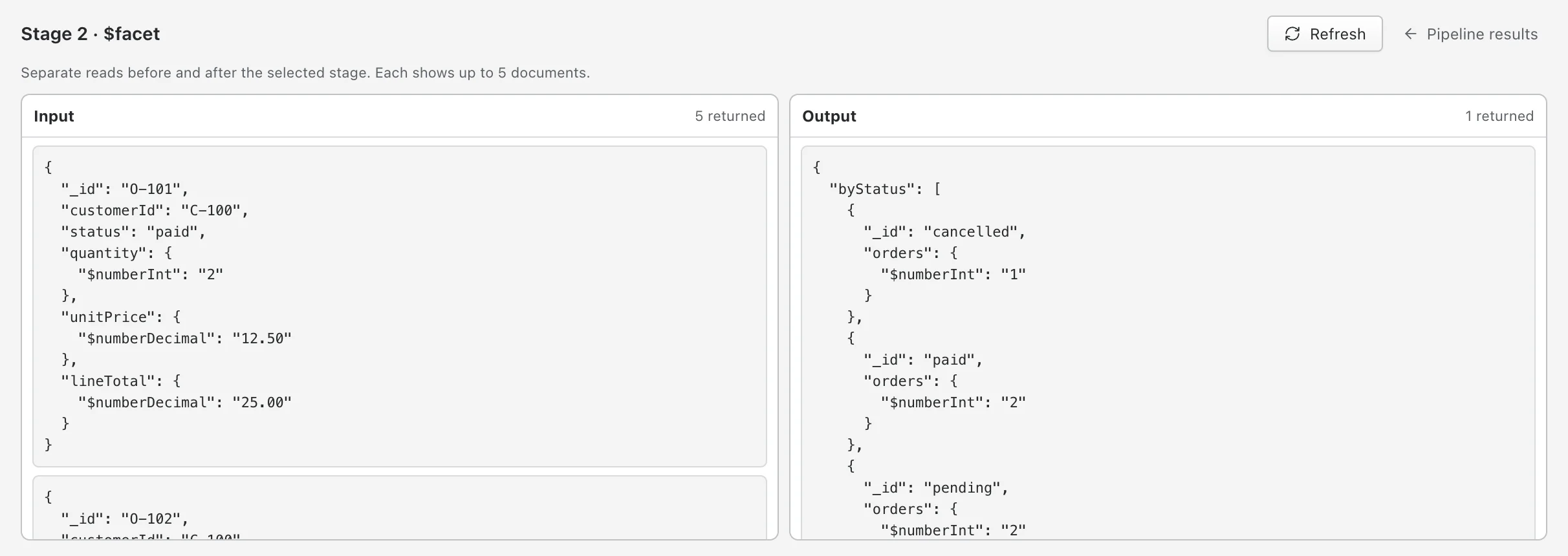
Switch to Stages and select $facet. The Input panel shows five orders with their calculated values. The Output panel shows one document with two arrays. Choose Pipeline results and switch to JSON view to read the nested values in the final result.
| Array | Status or summary | Orders | Order value |
|---|---|---|---|
byStatus | cancelled | 1 | — |
byStatus | paid | 2 | — |
byStatus | pending | 2 | — |
totals | All statuses | 5 | 43.80 |
The total is a single array entry with "orderValue": { "$numberDecimal": "43.80" } in Extended JSON. To restrict both summaries to a reporting period, put a date filter before $facet. To restrict one summary, put the filter inside that branch.
Inspect how the pipeline calculates line totals or group orders by reporting day.
To summarize prices by a fixed range, group orders with $bucket.